
What is faceted navigation?
Faceted navigation (or multifaceted navigation) is a User Experience (UX) technique that allows users to refine internal search results using multiple facets or filters. This approach enables them to find what they need more quickly and easily, significantly improving the browsing experience.
Faceted navigation is primarily used on e-commerce sites, where it helps improve product discoverability and reduce bounce rates. However, it is not limited to this sector: other content-rich sites can also benefit.
These include stock image platforms, business directories, job listing sites, travel portals, and, of course, all e-commerce stores.
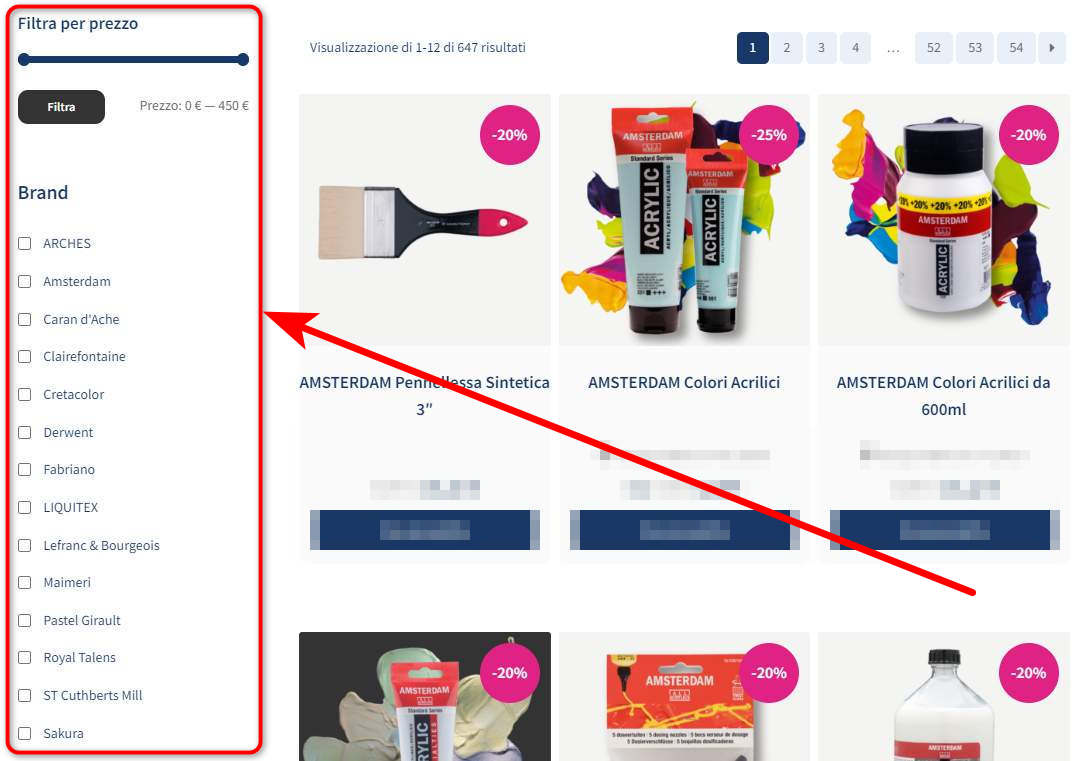
Faceted navigation is a technique commonly used in e-commerce sites, search engines, and portals with a large amount of content organized by various criteria (e.g., category, color, size). While useful for improving user experience, this navigation method can generate complications from an SEO and technical site management perspective.
How faceted navigation works:
- Filter selection: The user selects specific criteria, such as category, brand, or price.
- Results update: Results are updated dynamically (via AJAX or by reloading the page) based on the chosen filters.
- Generated URLs:
- Static URLs (e.g.,
/category/product/color/) - URLs with parameters (e.g.,
?color=red&brand=sony) - Hash-based URLs (e.g.,
#color=red) - Hybrid combinations.
- Static URLs (e.g.,
However, this flexibility brings a series of technical and SEO issues.
Although John Mueller assures us that duplicate content is not a factor that can lower a site’s ranking in search results, it could still cause keyword cannibalization and, consequently, the dilution of ranking signals.
Crawl Budget Waste
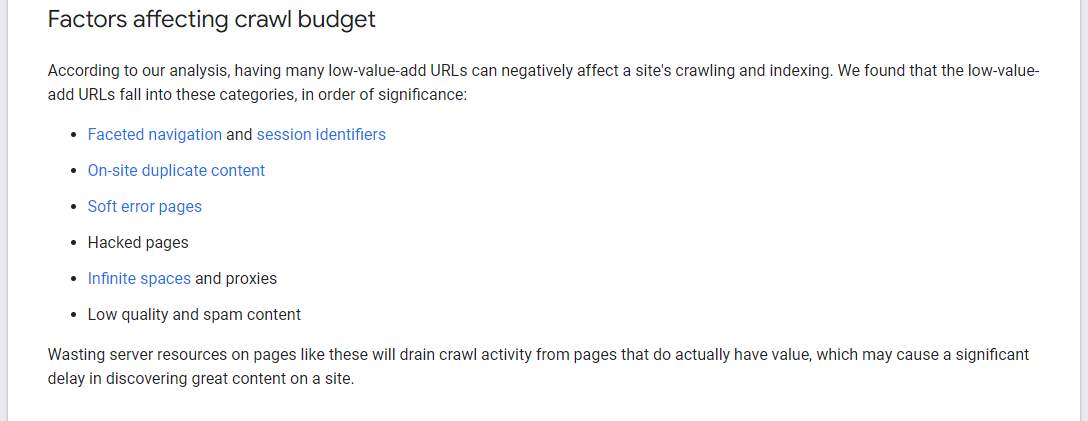
Faceted navigation generates a huge number of URLs, bloating the index and potentially causing crawl budget waste. If faceted navigation is not managed correctly, search engine crawlers might focus on unnecessary faceted pages, ignoring those that are truly important for ranking and indexing.
For this reason, Google considers faceted navigation one of the main factors responsible for crawl budget waste. Inefficient management of these URLs can limit crawling effectiveness, slowing down the indexing of relevant content and penalizing the site’s SEO performance.
Page Rank Dilution
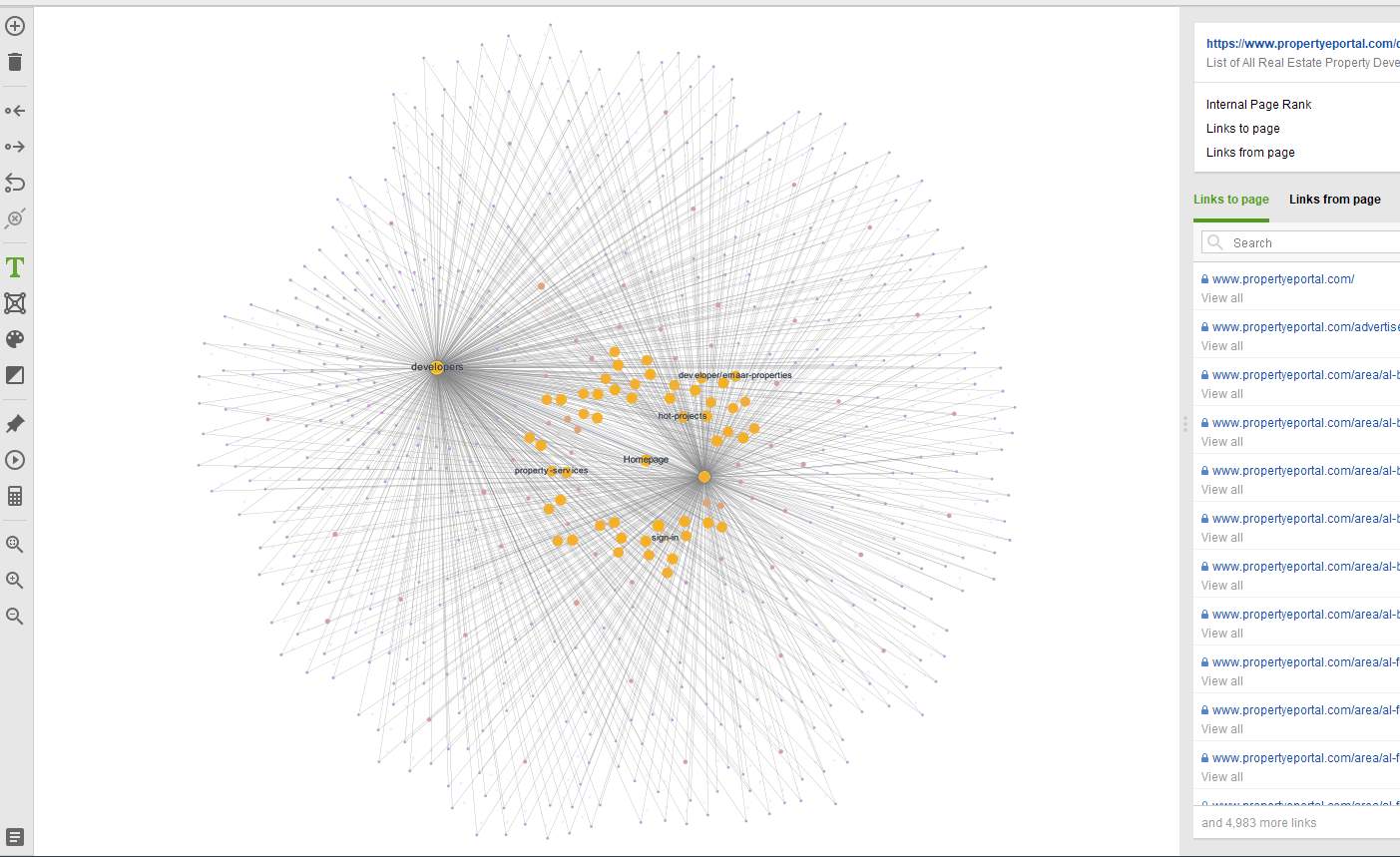
If you manage faceted navigation incorrectly, your Page Rank will be distributed across all faceted pages. This way, instead of improving the authority of the most important pages, such as main categories, your PageRank is split among a number of unnecessary faceted pages. Consequently, this does not contribute significantly to ranking improvement.
I use Website Auditor, which offers a very interesting graphic tool to show how much PageRank is diluted and crawl budget is wasted.
Here it is:
Lost Organic Search Traffic
You might think you can avoid all the problems mentioned above by correctly using canonical tags, noindex, or JavaScript. And you would be right, to a point. But there is a catch.
If you indiscriminately block all faceted URLs, you could miss out on valuable ranking opportunities. Specifically, you might fail to target relevant long-tail keywords, thus losing the chance to obtain a significant portion of organic traffic.
For example, a keyword like “40mm black Apple Watch strap” might have an interesting search volume. If you ignore this opportunity and block the crawling and indexing of the relative faceted page, you risk losing a great ranking opportunity and, consequently, traffic.
How to avoid these problems and benefit from faceted navigation
You can resolve these issues and even leverage faceted navigation to your advantage by following some best practices. Here is what to do:
Best Practices for Faceted Navigation
1. Manage facets strategically
Analyze the search volume for each facet or combination of facets to identify the most popular and useful ones from a ranking perspective. Focus on these to create optimized URLs that can capture relevant organic traffic.
If a facet has low search volume, it is not necessary for that page to be crawled and indexed. You can therefore block it using:
- Robots.txt: You can prevent the crawling of faceted pages via this method. However, blocked pages might still be indexed if they are linked from other pages on the site.
- Canonical Tag: This is a favorite method for many SEOs. You can set main categories as canonical URLs and have all faceted pages point to their respective parent pages. This helps avoid indexing issues and consolidates link equity. However, remember that canonical tags are seen by Google as a hint, not a directive.
- Noindex Tag: Unlike the canonical tag, the noindex tag is a directive and definitively blocks indexing. However, it does not prevent a faceted page from being crawled, leading to the crawl budget waste issue.
- AJAX: This can be a valid alternative. A new list is generated without reloading the page, so there are no faceted URLs to manage.
If a facet has a high search volume, you should leave it crawlable and indexable. This way, you can gain more organic search traffic. However, if you decide to leave a faceted page indexable, make sure to optimize it properly:
- Provide a unique meta title and meta description for each indexed page.
- Add unique text optimized for relevant long-tail queries.
- Include the URL in your XML sitemap.
Finally, if there are too many indexable pages, ensure you have sufficient server resources to support them. Your hosting servers should be able to respond promptly to crawler requests.
2. Avoid adding internal links to blocked faceted pages
It makes no sense to block the crawling of certain pages if they are still internally linked from other pages. They will still be crawled, and you will end up with a “bloated index” and wasted crawl budget.
Define a URL order for facet combinations
Users will not choose facets in the order or manner you prefer. They will do it as they wish, and for this reason, you must enforce a specific order.
For example, if you sell clothes, you must organize the facets in the URL in the following order: type > color > brand > size, keeping it unchanged regardless of the users’ selection order.
If this rule is not followed, faceted navigation could generate millions of new URLs.
For example:
https://example.com/en/s-2/availability-on_order/vat_exposed-yes
and
https://example.com/en/s-2/availability-on_order/vat_exposed-no
…are two different URLs. Now imagine how many URLs could be generated with more facets.
Take care of your mobile users
Faceted search was primarily designed for desktop users. Adapting it to mobile devices presents a challenge, as the mobile user experience differs significantly from desktop.
Limited screen sizes do not allow for showing all facets and a sufficient number of search results simultaneously. Furthermore, mobile pages should not reload after every single facet selection, as instant content changes can be frustrating for users.
One solution is to allow users to select all desired facets and then activate them with an Apply (or Done) button.
Another option is to show facet controls as a “push-out” tray at the top of the search items. This way, even when facet controls are open, some search results remain visible.
Avoid zero results and further search refinements
Letting users select all available facets only to show them a “No results” page is bad practice.
It is better to create co-dependent facets: if there are no matching items, disable or remove unnecessary filter options.
Furthermore, if such a page is indexable, it could create thin content. It will be useless for users: they will get frustrated and leave the site.
How do major CMS handle faceted navigation?
Popular CMS platforms like Adobe Commerce, Shopify, and WordPress allow you to set canonical tags and configurations in the robots.txt file for necessary URLs and categories. This approach may be sufficient for small to medium-sized sites.
However, to integrate and manage more complex faceted navigation on these platforms, you might need to purchase additional extensions or plugins.
There are multiple tools on the market, each with different features (e.g., some support AJAX, others do not). Choose carefully.
Conclusions
Here are the main points of the article:
- Faceted navigation can be very useful if managed correctly.
- Ineffective management can cause duplicate content, crawl budget waste, and PageRank dilution.
- You can solve these problems by using correct canonical tags, blocking faceted URLs in the robots.txt file, or adding noindex tags.
- Implementing AJAX for faceted navigation helps prevent issues by avoiding the creation of numerous URLs with similar content.
- Carefully manage internal links; if necessary, use nofollow for links to faceted pages blocked from crawling/indexing.
- If a faceted page has traffic potential, optimize it further and make it indexable.
- Define a clear order for facet combinations, thus avoiding the generation of millions of duplicate URLs.
- Do not allow your users to reach a page with zero results.
- Analyze the SEO tools of your CMS to manage faceted navigation; if they are not enough, use dedicated plugins or add-ons.
Faceted navigation can represent a valuable opportunity to improve user experience and SEO, but it requires careful and strategic management.
Avoiding issues like duplicate content, crawl budget waste, and PageRank dilution is possible through the use of canonical tags, robots.txt, and noindex, along with the implementation of AJAX to reduce unnecessary URLs.
Defining a clear order of facet combinations, optimizing pages with traffic potential, and carefully managing internal links are fundamental steps.
Finally, making the most of your CMS’s SEO tools or using specialized plugins will ensure efficient and high-performing faceted navigation.